
Deploys · Guides
Follow a deploy
Each deploy and rollback has a page: its log while it runs, then what it shipped, who ran it and how it ended.
Find the deploy
mybeast-deploy prints the deploy's page as it starts, and again when it ends. Your deploy command finds it in MYBEAST_DEPLOY_PAGE, to post it wherever you like. In Deploys, a running deploy is under Running now on the project's overview, and every deploy is in the app's history and in History.
A deploy is numbered per app, and its page says what it was: Deploy #12 or Rollback #13, with the environment beside it.
The log as it runs
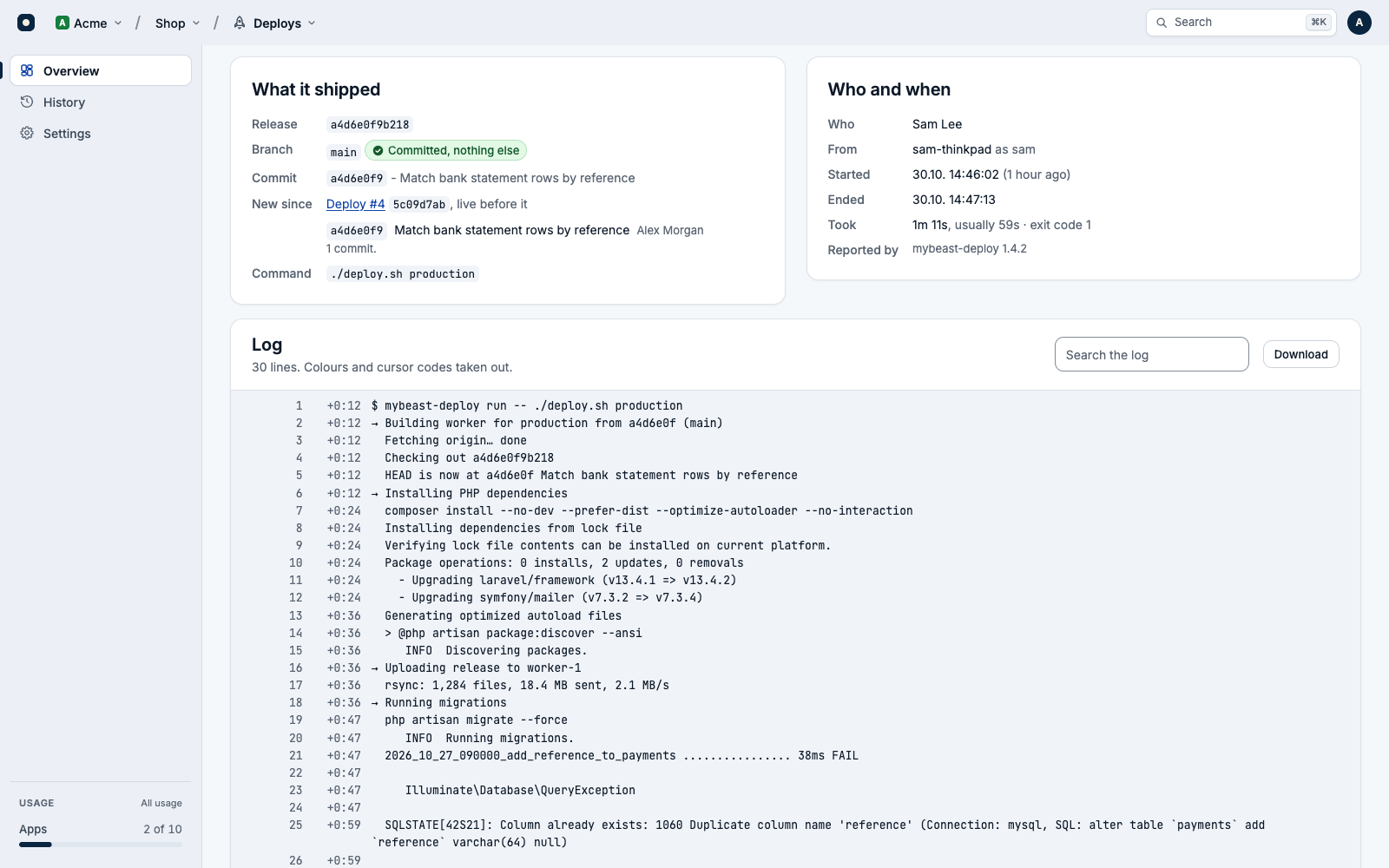
Your command's output reaches the page every 2 seconds while you watch. Each line has its number, which links to it, and how far into the deploy it arrived, such as +1:05.
- Colours and cursor codes are taken out, and a progress bar that redraws itself is kept as it last looked.
- Search the log finds a word among the lines; Download gives you the whole log as a text file.
- The page draws the last 20,000 lines; a longer log has its first lines in the download only.
- A log keeps 50,000 lines. Past that, lines are counted, not kept, and a line longer than 2,000 characters is cut.
Where it broke
A deploy that failed, or was lost, shows Where it broke, most likely: the line near the end of its log that says something went wrong, such as an error, a refusal or a timeout, with the exit code. Jump to it in the log takes you there. When no line says so, it is the last line the deploy printed.
What it shipped
- Release: what the build is called, named when it ends. See The line that names the release.
- Branch, with Committed, nothing else, or Uncommitted changes went along when the checkout had changes that weren't committed.
- Commit and its subject. It opens in the app's repository when the app names one.
- New since: the deploy that was live before it, and the commits since, from the last 50 the checkout sent. With a repository, Compare in the repository shows the whole change.
- Command: what ran, with any secret-looking value taken out.
A rollback says instead which deploy it Went back to, and its commit is that deploy's.
Who and when
- Who: the My Beast person whose e-mail address git gave, else git's
user.name, else the system user. - From: the machine, and the system user on it.
- Started, Went live (or Ended) and Took, with the exit code. Usually is the middle of the last 10 good ones of its kind there, once there are three; a deploy that took twice that, and a minute more, is marked Slower than usual.
- Errors: whether its release was named in Errors. See See that it worked.
- Told: the notices sent about it, and whether each arrived. See Was it sent?
Since this deploy
What the project's other products saw in the same environment after the deploy: from its start to 30 minutes after it went live (or ended), or until the next deploy there started. Errors, Logs and Incidents answer first, each with what it saw and a link, then everything on one line of time with the deploy's own moment among it.
Only the products the project has, and you may open, answer.
When it goes quiet
mybeast-deploy says it is still there every 30 seconds, even while your script waits for a password. After 2 minutes with no word, the page says so, and someone who triages the project can Close it, as lost, once they know it stopped. Closing it tells nobody.
After 10 minutes with no word, Deploys marks the deploy Lost and tells the project's people. A laptop closed mid-deploy, a network gone or a killed mybeast-deploy do this. A machine that comes back takes it up again: the rest of its log arrives, and so does how it ended.
Two deploys may run in one environment at once. The second is told on its start that the first is still running, and each page links the other. Neither is stopped.