
Errors · Guides
Work through issues
Every error joins the issue of its cause, and the inbox puts the issues doing the most harm first. Resolve what you fixed, snooze what can wait, ignore what never matters.
How errors become issues
Errors are one issue when they share all of these:
- the exception's class,
- its message, with ids, numbers and quoted values taken out,
- where it was thrown: the top frame in your own code, its file and function but not its line, which moves with every edit,
- for a chain of exceptions, the class and message of the cause at its root,
- the environment.
So Order 1182 not found and Order 2290 not found from the same place are one issue, and the same error on staging and in production are two. An issue's page says why its events are one under Why these are one.
Two issues that are really one cause can be merged, from Similar issues on either page: the other's events move over, and its next ones land in the merged issue. Only issues of one environment merge, and a merge can't be undone.
The inbox
Issues opens on the Inbox: the open issues of one environment, most harmful first: regressed, then spiking, then by customers hit, then by events, then new. The other tabs are New in 24 h, Regressed, Mine, Snoozed, Resolved, Ignored and All.
The search takes words or a reference. Under it you can narrow by release, by where it broke, by a person or an account, and by time. Each view has its own address, so you can send it to someone.
Tick issues to act on several at once: Resolve (without telling customers), Snooze 24 h, Assign to me or Ignore for ever. With a row ticked, the keys e, s and a do the first three.
An issue's page
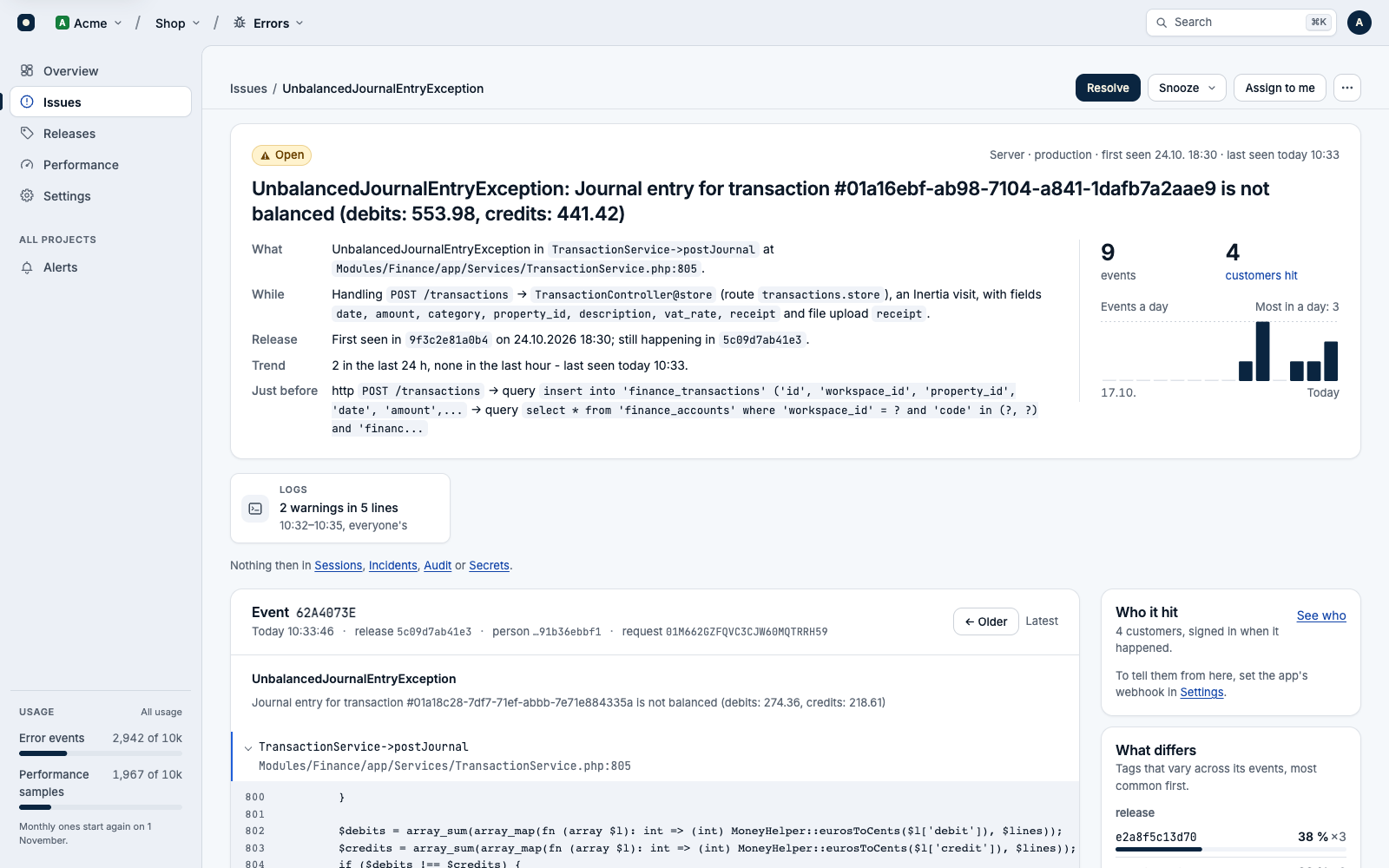
The head says what broke, while doing what, and in which release: when it was first seen, whether it's new in the latest release and so most likely brought by it. Below it, one event at a time:
- the stack, with the source lines around your own frames,
- Just before: the last steps, oldest first: queries without their values, log lines, the route or job,
- the recent events, each with its release and the person's id,
- Who it hit, What differs (the tags that vary across its events), Similar issues and the Activity of the people working on it.
If you use Logs or Sessions in the same project, the event opens its request's log lines and the person's recording at that moment. Copy as Markdown, in the issue's menu, copies the issue for a ticket or a chat.
Resolve
Resolved means fixed in the next release. Resolve asks when the customers it hit should hear it's fixed:
| Choice | What happens |
|---|---|
| When the next release is live | The notice waits until your deploy runs mybeast:errors-release with a newer release. |
| Now - the fix is already live | Your app is asked to tell them straight away. |
| Don't tell them | Nobody is told. |
An issue that hit no customer resolves at once, with nothing to ask. Telling customers needs your app's webhook: Tell the people it hit.
If a resolved issue happens again in a newer release, it opens again as a regression and alerts. An event from the release it was resolved in, or an older one, doesn't reopen it (Regressions).
Snooze
A snoozed issue stays quiet for an hour, 24 hours or 7 days, or until 10 or 100 more events. Then it wakes by itself, and if it kept happening meanwhile, a Back from snooze alert says how often. Unsnooze ends it early.
Ignore
| Choice | What happens |
|---|---|
| Ignore until it gets worse | It opens again, as a regression, at ten times its rate of the week before, and at least 10 in an hour. |
| Ignore for ever | It leaves the inbox and never alerts again. Reopen it to undo. |
| Ignore and stop storing its events | New events are counted, never kept, and don't count toward the month's events. For noise you can't fix and don't want to pay for. |
Assign and notes
Assign to me, or Assign to… anyone who opens the project in Errors. The Mine tab lists yours. Add a note leaves a line for your team in the issue's activity.
Who can change issues
id.my-beast.com. A Viewer reads.When one issue fires a lot
An error in a loop can arrive thousands of times a minute. Errors keeps full detail (stack, breadcrumbs, context) for the first few events of an issue each minute and each hour; the rest are kept light, with who, when, where and the message, and marked no stack. Every event still counts. The first event in a new release is always kept whole.